For English version click here
Garasje / Garage
Garasjen har egne husordensregler. Vennligst gjør deg kjent med dem før du tar garasjen i bruk.
Biloppstillingsplasser
Garasjeanlegget har innkjøring fra Wismargata 8. Du får tilgang til garasjen med din nøkkel eller via app.
Appen heter Unloc og kan lastes ned her. Du må også kontakte Usbl for å få tilgang til Sameiets Unloc-lås på B2/B3-porten. Hver boenhet får én bruker, som deretter kan dele tilgangen videre med andre.
Bare de som disponerer en biloppstillingsplass, kan parkere kjøretøy på faste plasser i garasjeanlegget. Det er 43 faste plasser i anlegget.

Korttidsparkering
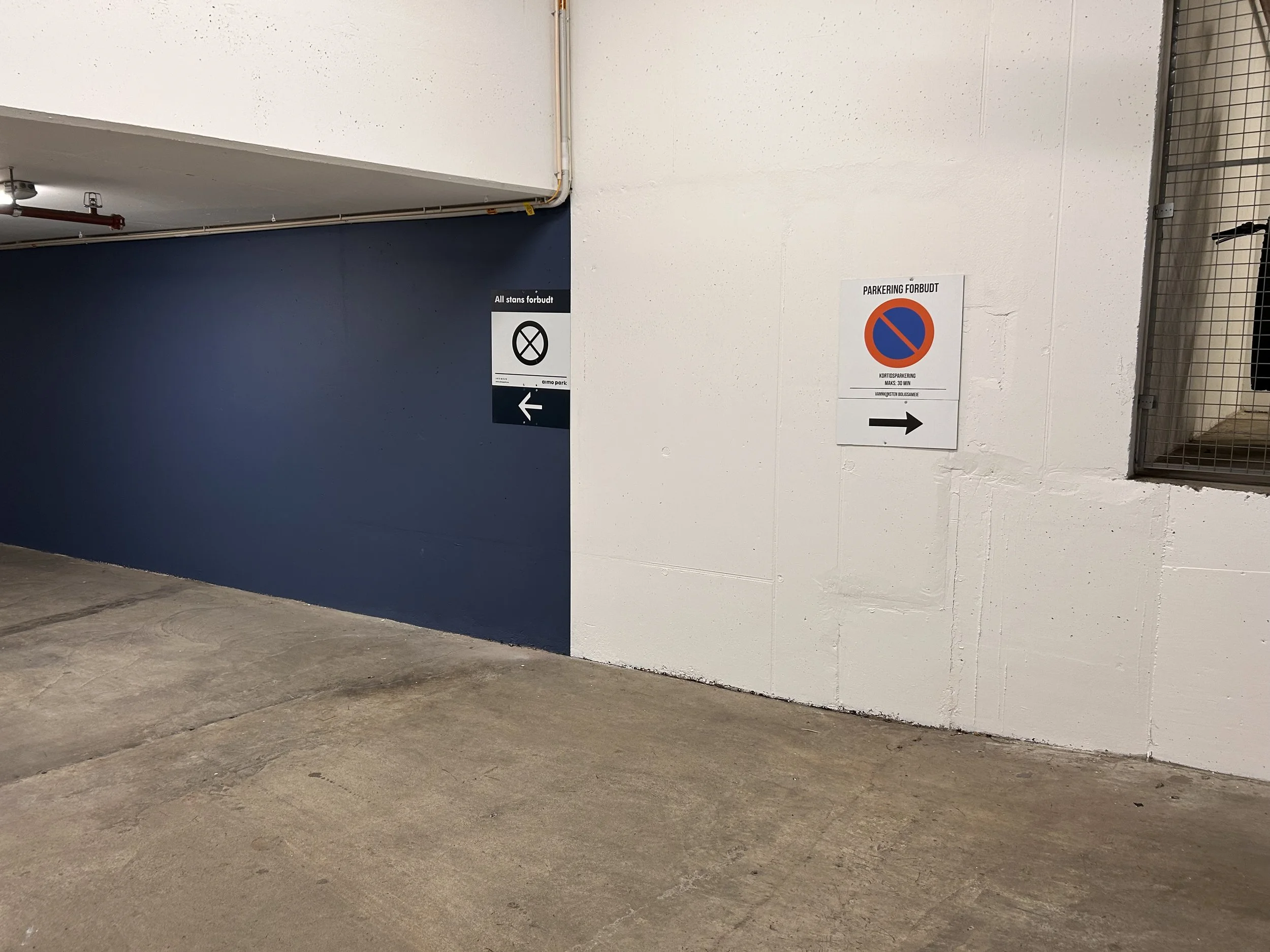
Vi har merket tre parkeringsplasser i kulvert etter multiparkanlegget. Den forste plassen er reservert korttidsparkering (30 minuter) og de andre to av disse plassene er reservert vaktmestere og håndverkere som utfører arbeid bestilt av styret.
Det er ikke tillatt å parkere bil utenfor merkede plasser. Feilparkerte biler vil bli rapportert til Aimo og fjernet for eiers regning og risiko uten forutgående varsel.
Elektriske ladere
Siden Januar 2026 bruker sameiet Charge365 by wattif EV. Eier av plass med lader skal ha mottatt en e-post med invitasjon til å registrere i Charge365-app, samt en ladeboks-ID som benyttes for å aktivere ditt ladepunkt. Dersom du ikke mottatt en slik e-post, ber vi deg kontakte styret slik at ny invitasjon kan sendes.
Last ned appen «Charge365 by Wattif EV» fra App Store eller Google Play.
Når appen er installert:
Åpne menyen øverst til venstre (ikon med tre streker).
Legg inn betalingsmetode under «Betalingsmetoder».
Aktiver abonnementet «Subscription plan for VANNKUNSTEN SAMEIET».
Når abonnementet er aktivert, må riktig ladepunkt legges til.
Dette kan gjøres enten ved å skanne QR-koden på ladepunktet eller ved å legge inn ladeboks-ID manuelt.
Du kan deretter starte og stoppe lading direkte i appen. Vi anbefaler at du lagrer ladepunktet som favoritt i appen, slik at du slipper å skanne QR-kode eller taste inn ladeboks-ID hver gang.
Support og hjelp
Dersom du opplever problemer, kan du kontakte Charge365 sin kundeservice support@charge365.noeller på telefon 93 09 53 65.
Kundeservice er tilgjengelig hele døgnet.
Dersom Charge365 ikke kan løse saken, eller henviser videre til styret, ber vi om at det sendes e-post til styret. Vi vil da forsøke å bistå så raskt som mulig.
Pris og betaling (per 01.01.26)
Det påløper en månedlig systemavgift på kr 89,- inkl. mva per aktivt ladepunkt, som faktureres sameiet av Charge365. Denne kostnaden belastes ikke direkte den enkelte sameier. Styret har derfor besluttet å øke felleskostnadene for sameiere med ladepunkt med tilsvarende beløp.
Strømprisen settes til spotpris.
Alle brukere betaler for sitt faktiske strømforbruk, og dette belastes direkte via Charge365-appen.
Rengjøring
USBL gjennomfører rengjøring av garasjen to ganger i året, vanligvis i april/mai og oktober/november. Styret informerer om de eksakte datoene noen uker i forkant. Påminnelser henges også opp i nærheten av heisene.
Eiere av parkeringsplasser 1–43 må flytte bilene sine ut av garasjen i forbindelse med rengjøringen.
Multipark-anlegget
Multipark-anlegget tilhører Sameiet Dronninglunden. Har du spørsmål om bruk av anlegget, ber vi deg ta direkte kontakt med styret i Sameiet Dronninglunden. De har et ansvarlig styremedlem som vil ta kontakt.
Viktig ved bruk av Multipark
For å unngå driftsstans og unødvendige kostnader er det viktig at bilen parkeres helt innerst på plattformen, slik at hjulene står helt inntil hjulstopperen. Feil plassering kan føre til driftsfeil, og kostnader for utrykning og reparasjon kan bli viderefakturert til den ansvarlige bileieren. Kostnaden vil variere avhengig av skadeomfang, tidspunkt og behov for service.
Et annet problem er at biler kjøres for raskt inn på plattformen. Plattformen har en sensor med grønt lys som er plassert mindre enn én centimeter fra plattformen. Dersom bilen treffer plattformen med for stor kraft, kan plattformen forskyves og sensoren komme ut av posisjon. Blir avstanden for stor, vil systemet stoppe, og Totalteknikk må tilkalles for å rette feilen. Kjør derfor alltid sakte og forsiktig inn på plattformen.
Multipark-anlegget vedlikeholdes av Totalteknikk, og det gjennomføres jevnlig service og rengjøring. Styret i Sameiet Dronninglunden vil informere eierne av Multipark-plassene i god tid før planlagt service eller rengjøring.
Mer nyttig informasjon om bruk av Multipark finner du i Q&A dokumentet her.
Rengjøringsplanen kommuniseres av Sameiet Dronninglunden via e-post.
Garage
The garage is subject to separate Garage Rules. Please review them before using the garage.
Parking Spaces
The garage is accessed from Wismargata 8. You can access the garage using your key or via the app.
The app is called Unloc and can be downloaded here. You must also contact Usbl to obtain access to the Sameiet’s Unloc lock at the B2/B3 entrance. Each residential unit receives one user account, from which access can then be shared with others.
Only those who have been allocated a parking space may park vehicles in the designated spaces in the garage. There are 43 permanent parking spaces in the garage.
Short-Term Parking
We have marked three parking spaces in the tunnel beyond the Multipark facility. The first space is reserved for short-term parking (30 minutes). The other two spaces are reserved for caretakers and contractors carrying out work commissioned by the Board. Parking outside marked spaces is not permitted. Incorrectly parked vehicles will be reported to Aimo and removed at the owner's expense and risk without prior notice.
Electric Vehicle Chargers
Since January 2026, the Sameiet has used Charge365 by Wattif EV. Owners of parking spaces with a charger should have received an email inviting them to register in the Charge365 app, together with a charger ID used to activate their charging point. If you have not received this email, please contact the Board so that a new invitation can be sent.
Download the Charge365 by Wattif EV app from the App Store or Google Play.
Once the app is installed:
Open the menu in the top left corner (three-line icon).
Add your payment method under “Payment methods.”
Activate the subscription “Subscription plan for VANNKUNSTEN SAMEIET.”
Once the subscription has been activated, you need to add the correct charging point. This can be done either by scanning the QR code on the charging point or by entering the charger ID manually.
You can then start and stop charging directly in the app. We recommend saving your charging point as a favourite in the app, so you do not have to scan the QR code or enter the charger ID each time.
Support and Assistance
If you experience any problems, please contact Charge365 customer service at support@charge365.no or by phone at +47 93 09 53 65. Customer service is available 24/7.
If Charge365 is unable to resolve the issue or refers you to the Board, please email the Board. We will do our best to assist you as quickly as possible.
Price and Payment (as of 1 January 2026)
A monthly system fee of NOK 89, including VAT, per active charging point is charged to the Sameiet by Charge365. This cost is not charged directly to the individual owner. The Board has therefore decided to increase the common costs for owners with a charging point by the corresponding amount.
The electricity price is based on the spot price.
All users pay for their actual electricity consumption, which is charged directly through the Charge365 app.
Cleaning
USBL carries out garage cleaning twice a year, typically in April/May and October/November. The board communicates the exact dates a few weeks in advance. Printed reminders are also posted near the elevators. Owners of parking spaces 1–43 are required to move their cars out of the garage during the cleaning period.
Multipark Facility
The Multipark facility belongs to Sameiet Dronninglunden. If you have questions about using the facility, please contact directly. They have a designated Board member who will assist you.
Important When Using the Multipark
To avoid operational problems and unnecessary costs, it is important that the car is parked all the way at the back of the platform, with the wheels positioned firmly against the wheel stop. Incorrect positioning can cause operational problems, and costs for call-outs and repairs may be charged to the responsible vehicle owner. The cost will vary depending on the extent of the damage, the time of day and the service required.
Another recurring issue is cars being driven onto the platform too quickly. The platform has a sensor with a green light positioned less than one centimetre from the platform. If the car hits the platform with too much force, the platform can move and displace the sensor. If the gap becomes too large, the system will stop working and Totalteknikk will need to be called out to correct the problem. Always drive slowly and carefully onto the platform.
The Multipark facility is serviced by Totalteknikk, with regular maintenance and cleaning. The Board of Sameiet Dronninglunden will inform owners of Multipark spaces well in advance of scheduled maintenance or cleaning.
More useful information about using the Multipark facility can be found in the Q&A document here.
Cleaning schedules are communicated by Sameiet Dronninglunden via email.